One contact per deal doesn't reflect reality
A $40,000 platform deal has a champion, an economic buyer, someone from IT, and often procurement. If the CRM only knows one name, nobody can see who hasn't been engaged yet.
TotalDeal is an AI-powered, deal-first CRM for growing B2B sales teams. It connects prospects, buying teams, follow-ups, proposals, signatures, customer onboarding, and billing in one intelligent workspace.
Most CRMs were designed to organize contacts. A B2B opportunity is not a contact — it's a group of people making a decision together over weeks or months, with artifacts and commitments piling up along the way.
A $40,000 platform deal has a champion, an economic buyer, someone from IT, and often procurement. If the CRM only knows one name, nobody can see who hasn't been engaged yet.
A deal can sit in "Proposal" for six weeks and look healthy on a board. What matters is whether anyone has a specific commitment to do something about it.
When the quote is built in a doc tool and signed somewhere else, the team loses the answer to "did they open it?" and "which version did they agree to?"
Everything the rep learned about stakeholders, requirements, and promises made during the sale gets re-collected by whoever runs onboarding — usually by asking the customer again.
The same data, two different jobs. Reps need a queue. Managers need to know what's real.
Open TotalDeal to what's due, what's overdue, and which of your deals has no next step. Ask "What should I do next?" and get a working queue instead of a report. Log a call in plain language and let Ask file the note, book the follow-up meeting, add the task, and update the deal value in one pass.
See which opportunities moved this week, which have gone quiet, and which are missing a decision maker or a next action. Deal health scores each opportunity 0–100 from real signals and shows the reasoning, so a pipeline review becomes a conversation about specific gaps rather than a status roll-call.
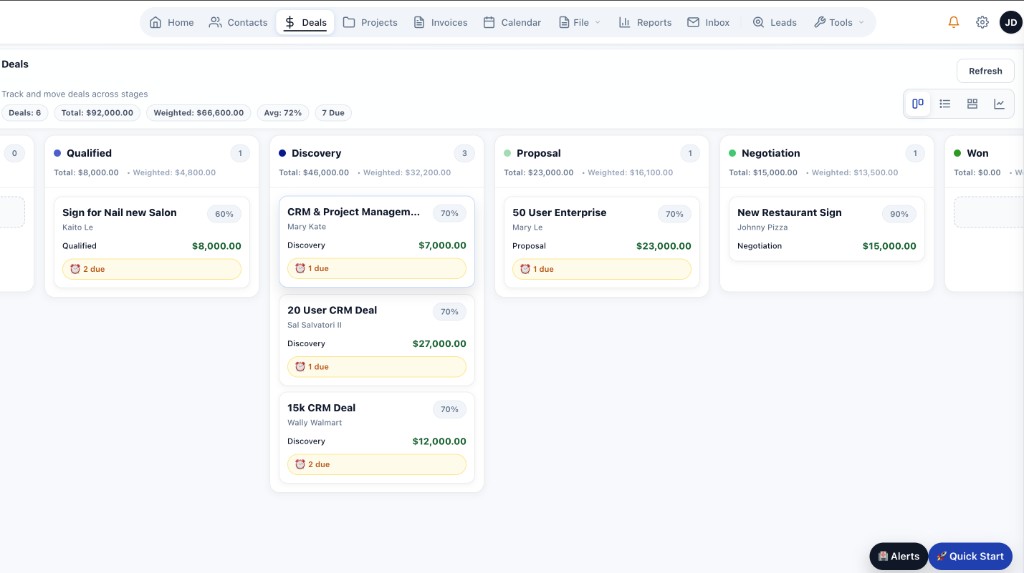
The deal board — every opportunity with an owner, a stage, and a next action.
These live on the deal itself, not in a folder somewhere adjacent to it.
Companies, the people inside them, and every deal, task, document, and invoice tied to the relationship.
Tag each stakeholder as decision maker, champion, technical evaluator, or another role your team uses.
Your own stage names, order, and win probabilities — which the weighted forecast then uses.
Every opportunity has an owner. Reassign it and the history, tasks, and documents follow.
A deal without a next action surfaces on its own, before a manager has to go looking for it.
Log meetings against the deal, capture what was discussed, and paste or upload a transcript to summarize it.
Build, send, and e-sign from the deal. Track sent, viewed, commented, and signed.
A score from activity gaps, stage stalls, missing decision maker, unsigned proposals, and overdue tasks.
Weighted pipeline by month and stage, plus closed revenue by rep.
Ask is a conversational assistant built into the workspace. It reads the data already in your CRM to answer questions, explain why something needs attention, and take the follow-up action. Included on the Pro plan.
What it doesn't do: Ask works from the data in your workspace. It does not research companies on the web, record your calls, or enrich contacts on its own. Deal health is scored from concrete signals rather than a black-box prediction, so you can see why a deal was flagged.
The workflow the product is organized around.
Website form submissions land as leads. Existing accounts import from your current CRM or a spreadsheet.
Record fit, budget, timing, and the compelling reason to act. Ask can suggest qualifying questions if a rep is newer.
Add each stakeholder with a role. Deal health flags an opportunity with no decision maker identified.
Log the meeting against the deal, capture requirements and objections, and set the next commitment before the call ends.
Build it from what the deal already knows, send for review, and watch it move from sent to viewed to signed.
Mark it Closed Won and convert it into a customer onboarding or implementation plan that inherits the account, contacts, owner, and value.
Turn a signed deal into customer onboarding or implementation without rebuilding the stakeholders, requirements, documents, pricing, tasks, and commitments collected during the sale.
A won deal converts into an onboarding plan linked back to the opportunity that created it. Whoever runs implementation can read what was promised instead of asking the customer to repeat themselves.
A client portal for reviewing documents, approving deliverables, uploading what you need from them, and paying invoices — replacing a thread of attachments.
Setup, configuration, data migration, integrations, pilots, training, and professional-services delivery all run as plans with tasks, milestones, and owners.
Implementation fees, annual agreements, deposits, milestones, and services invoice from the deal or the onboarding plan and collect through Stripe. Or keep QuickBooks — invoicing is optional.
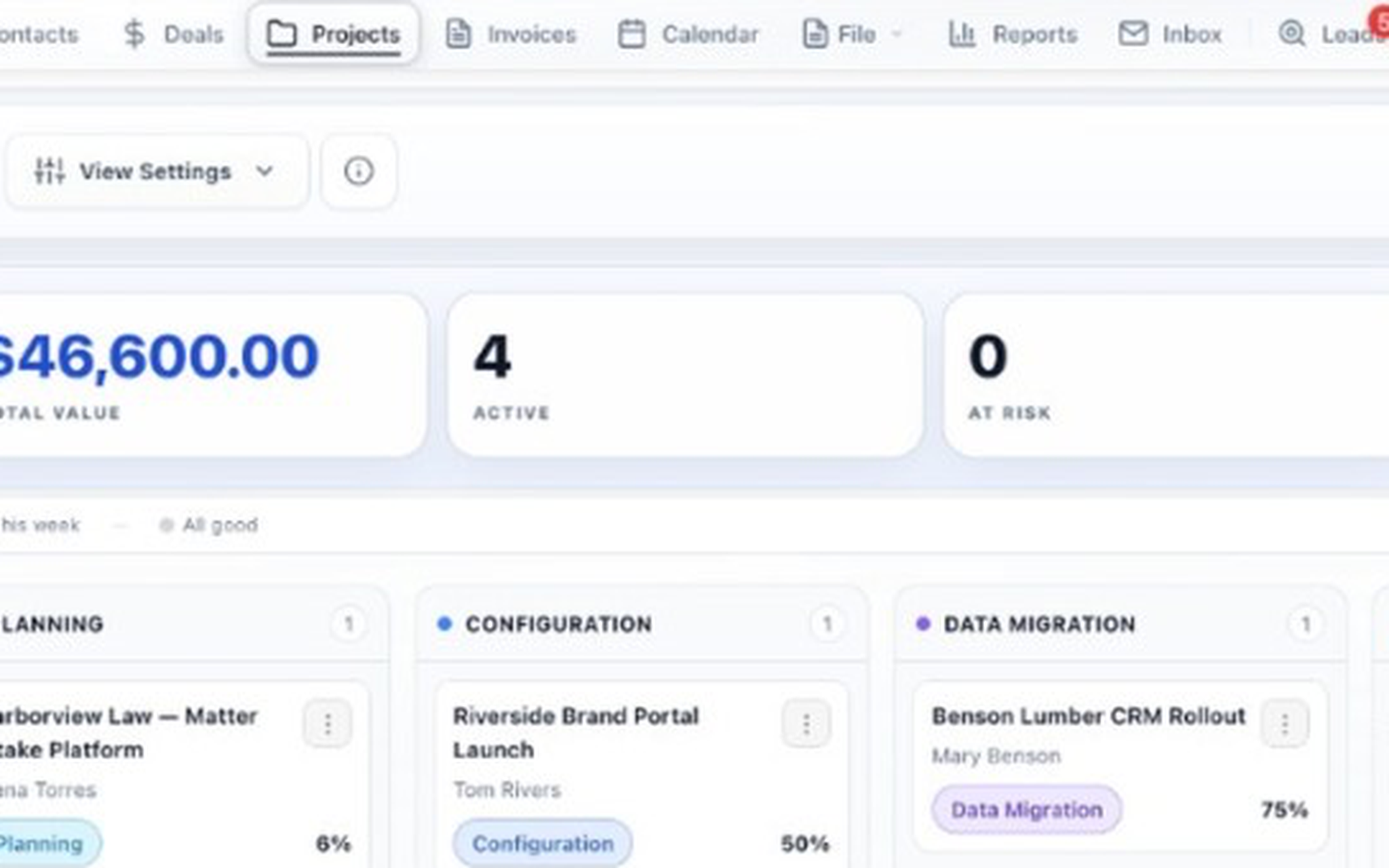
A won deal, converted into an onboarding plan with its context intact.
Most CRMs charge per seat, so every new rep raises the bill and someone starts rationing licenses. TotalDeal Pro is one flat price for unlimited users.
$0 forever, 1 user, up to 100 contacts. Enough to evaluate the pipeline and deal workspace on your own.
Up to 3 users.
Up to 10 users.
Unlimited users. A user is a login, not a stored contact.
AI features are part of Pro. See the full plan comparison →
The strongest fit is roughly 3 to 15 sales reps. That's the range where a shared pipeline, deal ownership, and manager visibility start to matter, but a long CRM implementation isn't realistic. Pro is one flat price for unlimited users, so adding sellers doesn't change the bill.
Yes. Pipeline stages are configured per workspace with your own names, order, and win probabilities. The weighted forecast uses those probabilities, so reporting reflects how your team actually sells.
A deal can hold multiple contacts, each tagged with a role such as decision maker, champion, or technical stakeholder. Deal health checks whether a decision maker has been identified, so an opportunity with only one contact on it gets flagged before it stalls.
Ask answers questions about your own CRM data in plain English and can take the follow-up action — creating a task, logging a note, moving a stage, drafting a follow-up email. It does not research companies on the web, record calls, or enrich contacts on its own. AI features are included on the Pro plan.
No. Invoicing is optional. Teams that want implementation fees, annual agreements, deposits, and services billed from the deal can do that and collect through Stripe. Teams that keep QuickBooks can sync invoices to QuickBooks Online or export for QuickBooks Desktop. TotalDeal is not a subscription-billing platform or an accounting system.
Self-service products that close without a human conversation, and teams looking for a marketing automation platform. TotalDeal is built for deals that involve multiple conversations, several stakeholders, and work to deliver after the signature.
Industry-specific workflows and the parts of the product covered above.
A 30-minute walkthrough covering your stages, buying committees, proposals, onboarding handoff, and billing path.