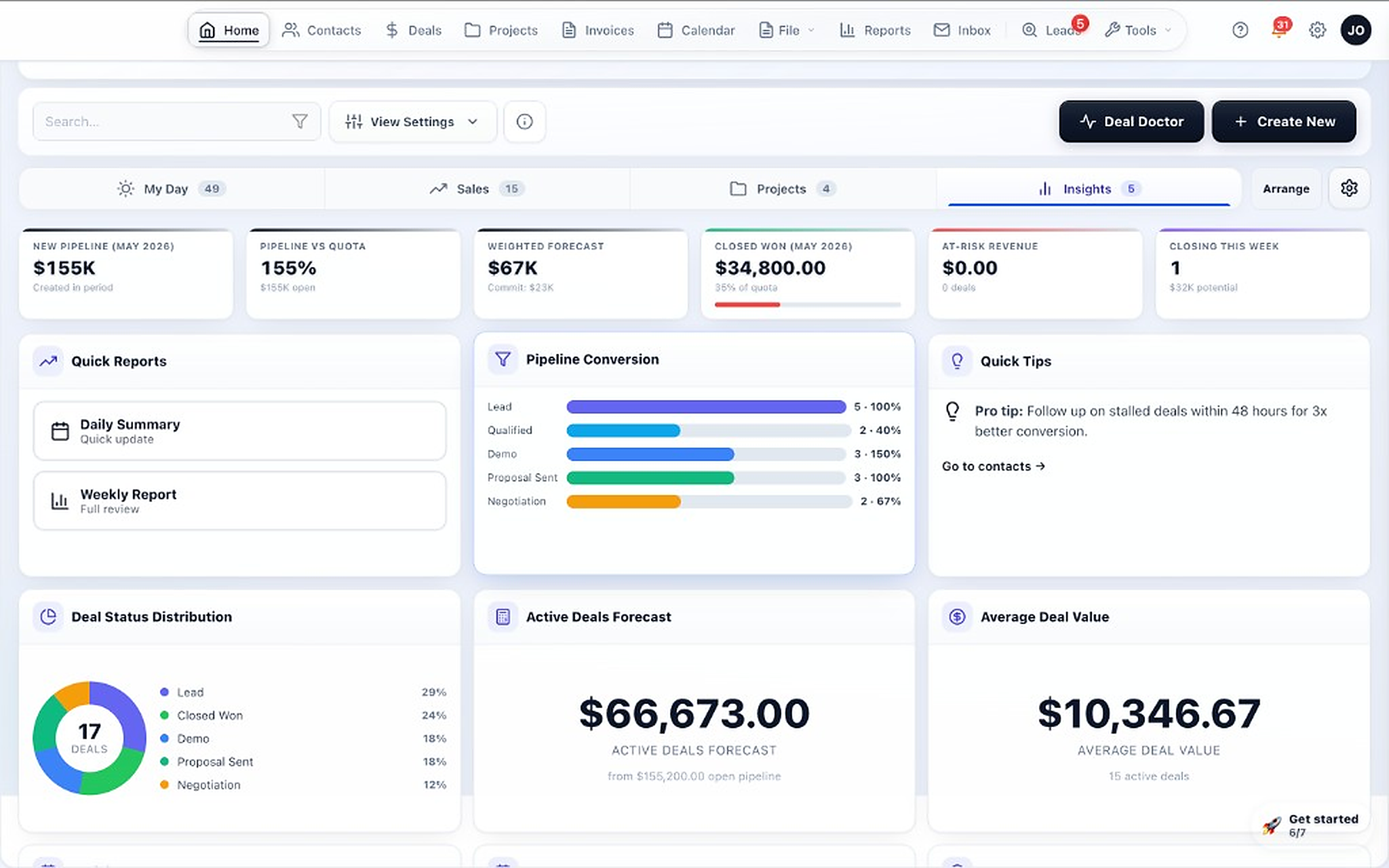
Command Center
Daily cockpit for pipeline health, forecast, and next actions.
Deals with buying-team roles, AI next-action guidance, proposals and e-signature, customer onboarding, a client portal, and optional invoicing — working as one system rather than a stack you stitch together.
Daily cockpit for pipeline health, forecast, and next actions.
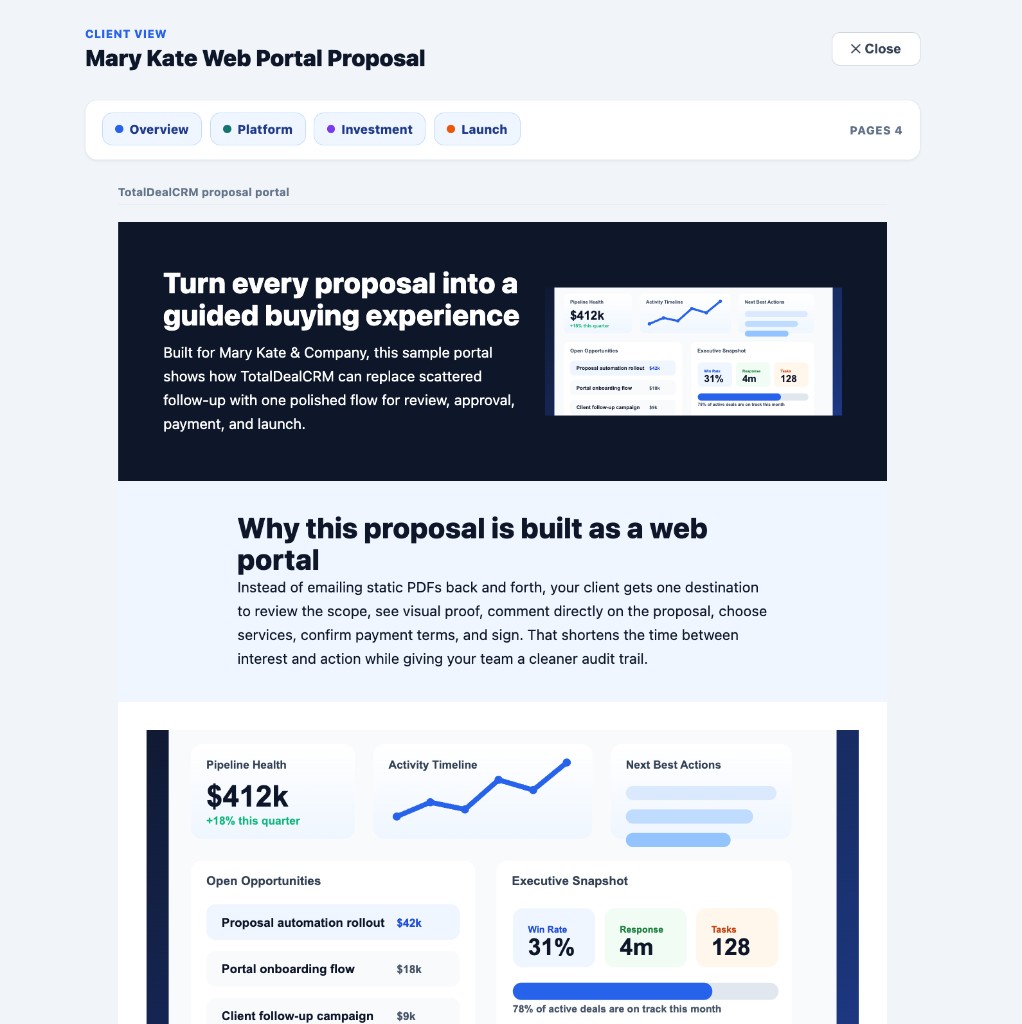
Branded portal for proposals, uploads, and client messaging.
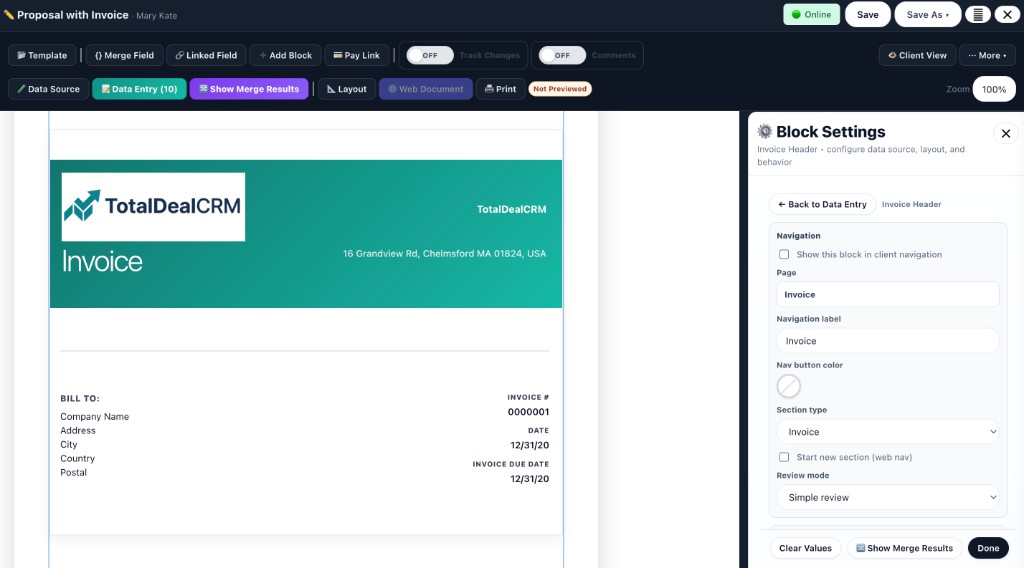
Create invoices and pay links where the signed work already lives.
A B2B opportunity is a group of people making a decision. TotalDeal holds all of it on the deal: the buying committee and their roles, the stage and probability, the next action, every meeting and note, and the documents the deal produced.
Define your own stage names, order, and win probabilities, then move opportunities across a visual board with drag-and-drop.
Put every stakeholder on the deal with a role — decision maker, champion, technical evaluator — so you can see which seat is still empty.
A 0–100 score built from activity gaps, stage stalls, a missing decision maker, unsigned proposals, and overdue tasks, with the reasoning shown.
Tasks, reminders, and next-step nudges on every deal, so an opportunity with nothing scheduled against it surfaces instead of sitting still.
Companies, the people inside them, and the full relationship history in one place, so a rep has context before reaching out.
Log meetings against the deal, capture requirements and objections, and paste or upload a transcript to summarize it.
Weighted pipeline by month and stage, closed revenue by rep, and pipeline value by stage without exporting to a spreadsheet.
Publish or embed a form so submissions land as leads automatically, and import existing accounts from a spreadsheet or your previous CRM.
Notes, calls, emails, meetings, and follow-ups stay attached to the opportunity so the deal reads as one story.
Demos, follow-up tasks, and onboarding milestones on one schedule.
Every opportunity has an owner, and reassigning it carries the history, tasks, and documents along with it.
Jump straight to records, actions, and workflows so experienced users move faster.
Ask is a conversational assistant built into the workspace. It reads the data already in your CRM to answer questions, explain why something needs attention, and take the follow-up action — then shows you each change before it saves.
“What should I do next?” · “Which deals have gone quiet?” · “Why is this deal stuck?” · “Deals over $20,000 missing next action” · “How's my pipeline?”
Create tasks and notes, log a meeting, move a stage, update a deal value, draft a follow-up email, or file a whole call recap in one pass.
A pipeline coach that surfaces stalled deals, missing next actions, unengaged decision makers, and unsigned proposals — with rescue suggestions.
Describe the list you want in plain language and get the filters applied, with an explanation of what the resulting segment actually contains.
“Prep me for my call with this deal” assembles the objective, agenda, and risks from the deal and contact history already in the CRM.
“Show pipeline summary table” · “How much closed revenue this month by rep?” · “Overdue AR report” — answered as tables you can act on.
What the AI does not do: it works from the data in your workspace. It does not research companies on the web, record your calls, or enrich contacts on its own. Deal health is a deterministic score from concrete signals, not a machine-learning close prediction. Ask, Deal Doctor, and AI Smart Search are included on the Pro plan and are not available on Free or Starter.
Deeper pages for the audiences TotalDeal is built for, plus the buyer questions teams research before booking a demo.
Buying committees, custom stages, next-action guidance, and forecast visibility.
Sales-assisted software deals through security review, order form, and implementation.
Pilots, proofs of concept, data-access commitments, and integration work.
Scoped engagements sold on expertise and delivered as projects.
Stage quality, forecast confidence, and rep-manager alignment.
Documents, approvals, portal access, and payment handoff in one system.
These comparison pages help buyers coming from familiar systems find the right TotalDeal angle faster.
For teams that want less setup weight and clearer daily execution.
For teams that need the workflow after the sale to stay connected.
For teams that want faster time to value and easier rep adoption.
For buyers evaluating the lead-to-payment workflow, not just the pipeline.
Sequences, the client portal, and billing are connected, so deposits and milestone invoices don't depend on someone remembering to click send.
Invoice steps, overdue triggers, and importable deposit, milestone, and reminder presets.
Customers approve scope, sign, and pay the deposit from one card in the portal.
An ordered checklist for the customer: review, approve, sign, pay, upload — no guessing what you need from them.
See views and payment-page opens on the deal before a customer goes quiet — including proposals viewed but not yet signed.
Suggestions for deals losing momentum and for outstanding invoices, with sequences you can start in one click.
Margin visibility, progress billing, and overdue-collections widgets on the dashboard.
Turn a signed deal into customer onboarding or implementation without rebuilding the stakeholders, requirements, documents, pricing, tasks, and commitments collected during the sale. This is the part most CRMs hand off to a different product.
A won deal becomes an implementation plan that inherits the account, contacts, owner, and value, and stays linked to the opportunity that created it.
Run active customer work in a dedicated area built for post-sale execution — setup, migration, configuration, pilots, and rollout.
Owners, due dates, and progress on both sides, so implementation has the same accountability the sale did.
Standardize a repeatable onboarding sequence so every new customer starts from a proven structure instead of a blank page.
Requirements, configuration notes, and delivery files attached to the work rather than scattered across folders and inboxes.
The full record of updates and actions, so anyone picking up the account can see what happened and what was promised.
Common uses: SaaS onboarding, AI implementation, data migration, system configuration, training, pilot programs, custom integrations, and professional-services delivery. More on onboarding and implementation →
This is one of TotalDeal’s biggest differentiators. You can create, store, share, review, approve, and track documents without forcing clients or staff into separate tools.
Store proposals, contracts, proofs, invoices, and support files in a central workspace instead of scattered folders.
Reuse existing documents and keep your team working from a shared source of truth.
Create business documents inside the platform with a dedicated editor built for customer workflows.
Build repeatable documents that pull in customer data automatically to save time and reduce errors.
Move documents from draft to reviewed and approved with less back-and-forth.
Review multiple asset types directly in the system so your team and clients can stay in one place.
Collect visual feedback directly on files to speed revisions and make comments easier to understand.
Use timestamped feedback to tighten review cycles for video deliverables.
See what changed over time and restore earlier versions when needed.
Compare versions more easily so edits and changes do not get missed.
Control edits, archive completed work, and keep files organized for long-term record keeping.
Package and deliver document sets quickly when customers or internal teams need complete file bundles.
Instead of sending clients to a patchwork of email threads and file links, TotalDeal gives them a secure place to view documents, respond, approve, and stay aligned.
Give customers one place to access the materials tied to their deal or project.
Invite customers into the portal with a guided experience instead of sending confusing manual instructions.
Keep document questions and feedback attached to the work itself so nothing gets buried in email.
Make it easier to move from draft to decision with visible approval states.
See whether documents were viewed and interacted with so your follow-up timing gets smarter.
Support team collaboration on documents with better visibility into who is working where.
From lead capture to process automation, these features help you standardize how information enters the system and how follow-up happens next.
Create intake and request forms without needing a separate form platform.
Publish forms for customers to submit online and route responses directly into your workflow.
Show the right questions based on answers so forms feel cleaner and collect better information.
Push submitted data into the right records automatically to reduce manual entry.
Track the exact business data your process needs instead of forcing your team into generic fields only.
Support more advanced structured records when a simple contact note is not enough.
Automate follow-ups and step-based processes so important next actions happen on time.
Give your team quick access to common actions and reduce repetitive clicks.
Run the day from a central operations view that highlights what needs attention now.
Communication tools are built into the platform so you can move from customer data to outreach without exporting lists or switching apps.
Write and send emails with customer context already available where you need it.
Manage conversations from inside the app so your team can stay connected to customer history.
Reuse proven messaging while still personalizing outreach with contact and company data.
Send bulk updates and targeted messages to the right audience segments from your CRM.
Keep leads warm and customers informed with scheduled, multi-step communication flows.
Speed up drafting and response workflows with built-in assistance tools.
Capture spoken notes quickly and keep those details attached to customer records and workflows.
Track more than just email so your activity history reflects the full customer relationship.
Make customer communication easier to understand when multiple people work the same account.
Annual agreements, implementation and setup fees, consulting and professional services, deposits, and milestones — billed from the deal or the onboarding plan, with payment collected through Stripe. TotalDeal is not a subscription-billing platform or an accounting system, and doesn't try to replace one: keep Stripe Billing and QuickBooks where they belong.
Create and manage invoices in a dedicated billing workspace without leaving the platform.
Build billing documents faster so approved work turns into revenue sooner.
Add detailed line items, package structures, and pricing data with more control than a basic invoice form.
Break work into staged payments so larger projects are easier to bill and collect.
Share public invoice links so clients can review and pay without extra friction.
Request payment with a simple link when you do not need a full invoice flow.
Let clients pay online using a trusted checkout experience tied to your billing workflow.
Generate shareable invoice documents for formal sending, downloading, or record keeping.
Standardize payment-related communication so clients know what is due and when.
Monitor invoice status, due dates, and paid progress in one place.
Sync or export invoice data when you need accounting handoff outside the CRM.
Give customers a direct route to complete payment from a browser-friendly page.
These features help a growing team understand performance, control setup, and keep the workspace usable as more sellers come on.
See key trends and business activity in a simpler view than stitching together reports manually.
Build reports around the metrics and workflow data your business actually cares about.
Start from reusable report structures to get answers faster.
Export data when you need to share, analyze, or back up operational information.
Add teammates, manage workspace access, and keep collaboration centralized.
Control workspace behavior, company info, billing setup, and user preferences from inside the app.
Help new workspaces get set up faster so teams reach value without a long implementation cycle.
Support different working styles while keeping the system consistent for the team.
Keep CRM, projects, documents, email, and billing connected so your data stays useful across the full customer lifecycle.
These pages go deeper into the specific use cases teams research when they need a closer fit — including the client-services workflows the platform has always supported.
The primary buyer page: buying committees, custom stages, next actions, and forecast.
Sales-assisted software deals through security review and implementation.
Pilots, proofs of concept, data-access commitments, and integration work.
See the buyer page focused on small business CRM needs.
Explore the billing-focused workflow for teams that need CRM and invoicing together.
See how documents, approvals, proofing, and customer history can stay connected.
Explore the secure portal workflow for approvals, communication, and client visibility.
See how sales handoff and project delivery can stay in one system.
See the small-business angle on document workflows, approvals, and file organization.
Read the practical guide for connecting follow-up, delivery, invoicing, and payment.
Read the operating model behind the full customer workflow.
Explore the service-business version of the same platform.
See the freelancer workflow for proposals, approvals, and payments.
See the creator workflow for revisions, approvals, project tracking, and payments.
Explore the approval-first workflow for signoff, proofs, and revision tracking.
See how consulting teams can run sales, delivery, and billing in one system.
See how proposals, approvals, delivery, and billing can stay in one workflow.
Explore milestone visibility, delivery workflows, invoicing, and payments for consulting teams.
See how signed work can move into kickoff, setup, delivery, and payment follow-through.
See the lead-to-proposal-to-billing workflow in one connected CRM.
Explore signoff, revisions, delivery visibility, and billing follow-through.
See the client-facing portal workflow for files, approvals, updates, and payments.
Explore a more connected workflow for updates, approvals, documents, and billing.
See how proof reviews, signoff, delivery, and payments can stay connected.
Compare quoting, approvals, invoicing, and payment collection in one system.
See the client-facing project portal workflow for status, files, approvals, and billing handoff.
Explore billing follow-up with CRM context, payment visibility, and pay links.
Compare comments, revisions, approvals, and project context in one workflow.
See how connected workflows beat spreadsheet-heavy operations.
Learn how to reduce status-chasing with stronger client-facing visibility.
Use a practical checklist to improve review, revision, and signoff flow.
See how service teams should structure stages, approvals, delivery, and billing.
These are the highest-intent paths for teams comparing tools, researching workflows, or looking for a more complete client-work system.
For owners, managers, and reps who need lead visibility, reminders, custom views, and forecasting.
For buyers comparing setup speed, usability, pricing clarity, and workflow depth.
For teams comparing cost, rollout speed, and how many other tools they still need.
For very small teams where sales, operations, and delivery often overlap.
For teams that want accepted work to flow into delivery and billing.
For teams tightening review, revision control, signoff, and handoff.
For teams that need proofs, revisions, and clearer signoff.
For businesses tightening the handoff from signed work to kickoff.
For teams that want a practical checklist for kickoff, setup, and billing readiness.
For consulting teams unifying lead tracking, delivery, and billing.
For firms that need milestones, documents, and payments tied together.
For teams that want files, approvals, and customer records in one place.
For teams that want the full path from lead to proposal to paid invoice in one CRM.
For businesses that want a cleaner, more professional client-facing workflow.
For teams that want clients to review files, approve work, and stay aligned in one place.
For teams that need a clearer path from draft to signoff to payment.
For teams that want customer communication tied to the actual work and billing.
For teams that need a stronger workflow around reviews, revisions, and approvals.
For teams tightening the path from quote approval to invoice and payment.
For teams that want clients to see project status, files, approvals, and next steps in one portal.
For businesses that want billing follow-up tied to CRM context and payment visibility.
For teams that want a cleaner process for collections, reminders, and payment tracking.
For teams that want comments, revisions, and approvals connected to the actual work.
For teams that want to understand the real gains from better follow-up and workflow continuity.
For buyers researching where the category is moving this year.
For teams that need rep focus, manager visibility, and better forecast discipline.
For teams that want cleaner ownership, prioritization, and next-step control.
For teams that need stages, activity, and forecast views to stay aligned.
For teams that want shared context around customer history, tasks, and deals.
For teams replacing manual tracking with a clearer operating system.
For buyers looking for a lighter system with clearer execution.
For teams that need more workflow depth after the sale.
For teams moving from flexible notes into structured ownership and follow-up.
For teams that want visible calls, notes, reminders, and real pipeline motion.
For teams that need clear owner, stage, next step, and forecast-ready deal context.
For managers that need more believable projections and better weekly review visibility.
For teams that want overdue follow-up and next actions to stay visible.
For buyers comparing rep usability, manager visibility, and workflow depth.
For buyers that want a practical framework before choosing a system.
For teams moving from flexible tables into a more structured sales workflow.
For businesses that need stronger CRM depth before work is won.
For teams that want practical guidance on better follow-through.
For managers that want a repeatable review rhythm for the sales pipeline.
For teams that need clearer manager visibility across pipeline, owners, and risks.
For teams that want coaching, reviews, and forecast support inside one workflow.
For businesses that need ongoing reminders and relationship visibility after the sale.
For founders and owners that still drive much of the pipeline themselves.
For early teams that need fast setup and clean growth into more structure.
For buyers that want a more useful framework than feature-count inflation.
For teams deciding when manual tracking has started costing too much.
For buyers comparing setup, migration effort, training, and adoption cost.
For managers building better review habits and more useful dashboard views.
For teams that want more believable forecasting without heavy enterprise tooling.
For teams looking for a lighter CRM with clearer daily execution.
For teams moving out of patchwork inbox and spreadsheet workflows.
For teams replacing memory-based sales discipline with visible next steps.
For teams that need sales, delivery, documents, and billing continuity.
For agencies that want pipeline, approvals, project context, and invoicing connected.
For consultants that need stronger flow from lead to paid engagement.
For teams that need estimate follow-up, customer context, and billing visibility.
For teams that want the fastest path to a useful small-team CRM setup.
For teams building a simple, repeatable process around stages and follow-up.
For teams tightening ownership, reminders, and activity visibility.
For teams moving from project-only tooling into a fuller client-work operating system.
For teams that want lead, delivery, documents, and billing context closer together.
For teams turning a basic contact list into an actionable sales workflow.
For teams that need proofs, revisions, approvals, and billing continuity.
For teams that want ownership, views, and activity history around contacts.
For teams planning a practical migration of active contacts, deals, and owners.
For teams that want stronger usage habits after the CRM goes live.
For teams balancing rep focus, manager oversight, and shared visibility.
For teams that want a staged timeline from setup through first value.
For teams that want a simple rollout checklist for launch and adoption.
For teams that want CRM, projects, documents, approvals, and billing in one system.
For businesses that need the workflow after the sale to stay connected.
For buyers comparing service-business CRM options on workflow depth.
For buyers researching the real reasons teams leave their current CRM.
For buyers that want to avoid overbuying complexity or underbuying headroom.
These pages help buyers understand the product visually and operationally, which is one of the fastest ways to make the website feel more established.
Walk through the CRM, projects, documents, portal workflows, invoices, and payments as one system.
Browse the visual library of workspace, proofs, deliverables, and client-work context.
See the plan structure for teams replacing a disconnected stack with one system.
Use a guided walkthrough if you want the product mapped to your exact workflow.
These pages help the site feel more established by showing how the platform is explained, supported, and implemented beyond the core feature list.
Browse guides, workflow articles, trust pages, and supporting content in one place.
Read the concise product case for why teams buy a more complete client-work system.
See the stack-replacement story across CRM, portal, approvals, projects, and billing.
Use the compare hub to jump into the closest buying angle.
See how small teams can configure the first useful workflow without overbuilding the system.
See the rollout path for teams that want to get value quickly without a complex implementation.
Review portal access, storage, permissions, and practical security expectations.
See how new customers get answers, guidance, and workflow help after signup.
Learn the key terms behind approvals, portals, invoicing, and client-work operations.
Read the product point of view and why the platform is built around client-work operations.
Compare a connected system against spreadsheet-heavy operations.
TotalDeal replaces a stack of disconnected tools with one system that helps a B2B team decide what to do next, close the deal, and carry everything promised during the sale into onboarding and billing.